
Summary: Every customization decision you make in Fusion Cloud becomes a debt you pay at the next release update — unless you make it the right way. Configure first. Personalize where the change is user-specific. Extend only where Oracle supports it. Use BPM Worklist for approvals and notifications, AI Agent Studio for governed AI-assisted execution, and move truly new capabilities outside the Fusion core onto Oracle PaaS or a standalone Visual Builder application. That discipline keeps the core supportable, upgrade-safe, and consistent across environments.
Why This Pillar Matters
Every Fusion Cloud implementation eventually encounters the same question: how do we tailor the application without breaking it?
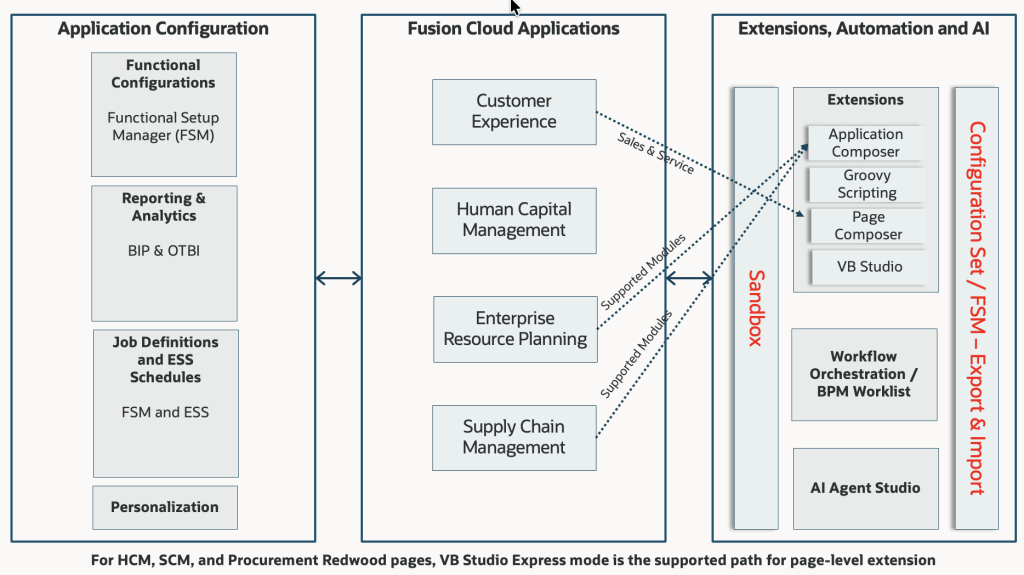
The answer is not a single tool — it is a decision boundary. Oracle’s configuration model separates changes into configuration, extension, and personalization. All three are preserved through release updates. That is the right operating model for a cloud application: let the product carry the workload, tailor the experience where the platform already supports it, and avoid converting the application core into a custom-code surface.
The value here is control. The same business change can touch multiple downstream artifacts simultaneously — a data-model change can surface in pages, mobile, and reports; a UI text change can affect labels and help content; a scheduled job or approval rule can alter operational behavior across the business. The right pattern is not “customize until it works.” It is “select the correct supported mechanism and keep the scope narrow.”
The Vocabulary: Configuration vs Extension vs Personalization vs Customization
Before making any design decision, the team needs a shared, precise vocabulary. These four terms are not interchangeable, and conflating them is one of the most common sources of architecture drift.
Configuration covers changes made through Oracle’s setup and administration tooling — functional setup manager tasks, profile options, lookups, flexfields, sandbox-based page edits. These are preserved through updates and represent Oracle’s supported mechanism for adapting the application to business requirements.
Extension is a controlled, platform-supported addition to the application’s behavior — adding attributes through DFFs/EFFs, extending objects through Application Composer, adjusting page layouts through Visual Builder Studio in Express mode. Extensions operate within Oracle’s supported framework and are preserved through updates, but they carry a footprint that must be managed.
Personalization is user-specific. It covers changes a user or administrator makes to their own view — column visibility, page layout preferences, saved searches. These are scoped to the individual and should never be conflated with shared configuration.
Customization, as used in this series, is an architectural term for a new capability that cannot be met through any of the above, nor through BPM Worklist or AI Agent Studio. Those requirements belong outside the Fusion core — typically on Oracle PaaS or a standalone Visual Builder application — and should be integrated back through supported interfaces. This is not a failure of the platform; it is the correct architectural response when a requirement genuinely exceeds what Fusion is designed to deliver natively.
The Decision Framework
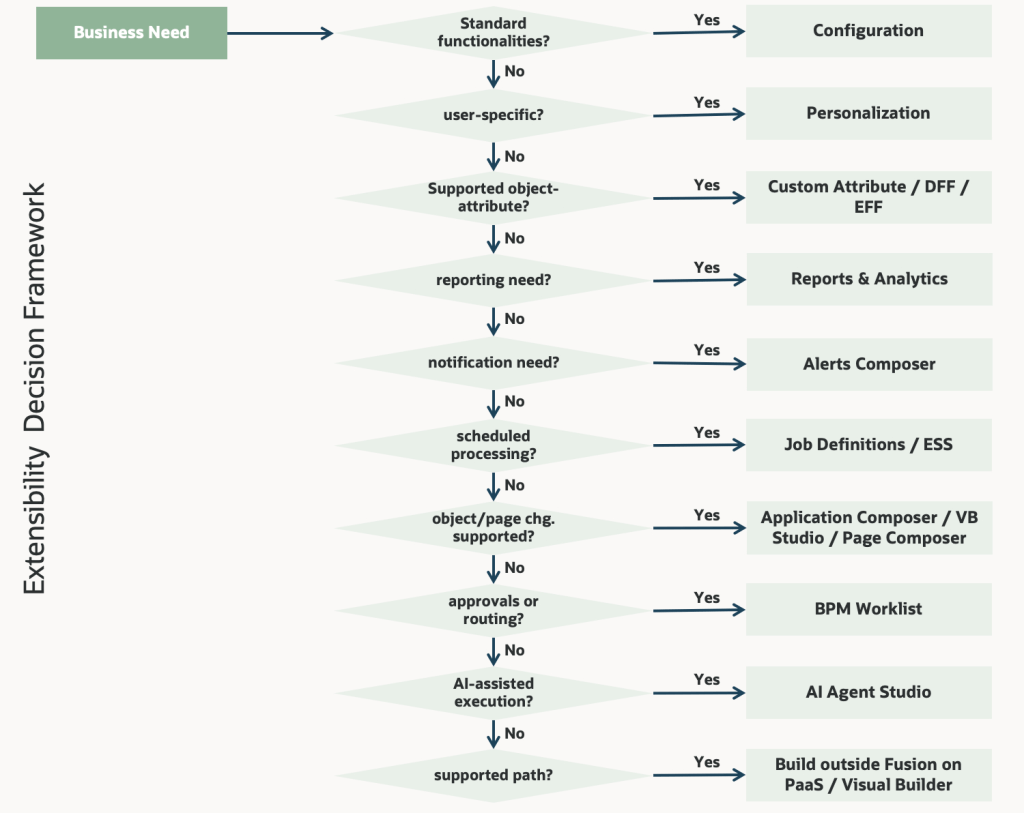
The framework is deliberately simple, because complexity here creates exceptions, and exceptions become permanent architecture debt.
Step 1: Can the standard product satisfy the requirement? Use it. Configure in a sandbox or test environment, validate the result, migrate through a controlled path to production.
Step 2: Is the change user-specific? Use personalization. Do not add shared configuration to solve a single user’s preference.
Step 3: Does the requirement need a supported extension? Use the least invasive supported tool — DFF/EFF for attributes, Application Composer for object-level changes in CX and Service, VB Studio Express mode for Redwood page adjustments in HCM and SCM.
Step 4: Does it involve approvals or event-driven notifications? Use BPM Worklist for approval routing and notification delivery. Use Alerts Composer for event-style notifications where that is the functional fit.
Step 5: Does it involve AI-assisted execution? Use AI Agent Studio for governed, platform-native AI execution. Do not build custom AI integrations into the Fusion core.
Step 6: Is the requirement genuinely new — something Fusion does not support through any of the above? Build it outside the core on Oracle PaaS or a standalone Visual Builder application. Connect it back through supported interfaces. Keep Fusion clean.
The boundary between steps must stay unmistakable. That is the only reliable way to preserve supportability and avoid turning a single business request into a permanent architecture exception.
Lifecycle and Migration Controls
Configuration and extensibility decisions are only sustainable when paired with a controlled migration path. Oracle’s migration model supports this through migration sets on the Migration page — allowing import into a sandbox in the target environment before applying to mainline, and supporting delta migration for sandbox-aware modules.
The practical implication: the target environment should never be configured directly if the goal is to preserve consistency between environments. The migration path is a design activity, not an afterthought. Teams that treat migration as something to sort out at go-live consistently find themselves reconciling environment drift under time pressure.
Business Scenarios by Pillar
HCM
A global HR team needs a region-specific attribute, a notification, and a conditional approval step. The right design is to configure the standard process first, add a governed DFF or EFF only if the attribute is truly required, use Alerts Composer for event-style notifications, and use BPM Worklist for approval routing. User-specific display preferences belong in personalization, not in shared configuration. For Redwood pages in HCM, the supported page-level extension path is VB Studio Express mode only.
ERP
Finance wants reporting context, recurring jobs, and a stable release path without altering the accounting model. The answer is governed configuration: expose reporting through Reports & Analytics, define recurring processing through ESS job definitions and schedules, and keep the core object model intact unless the requirement genuinely belongs in Application Composer or an external custom application.
SCM
Supply chain needs a role-based page adjustment and a validation rule for a controlled process. This is a strong fit for page configuration and localized logic — not a wholesale redesign of the process flow. For Redwood pages in SCM, the supported path is VB Studio Express mode only. If the process also needs approvals, BPM Worklist handles the routing model. If it needs a new object-level capability, Application Composer is the supported extension path for the relevant objects.
CX
Customer experience often requires a tailored object, action, or guided journey around a standard transaction. Application Composer is the right tool for object-level changes. Visual Builder Studio is the right choice when the experience itself must be extended in a supported way. When the business asks for a completely new capability, the cleaner pattern is to deliver it outside the Fusion core and connect it back — not to force it into the application through unsupported means.
Best Practices
Use the standard product first. Configure in a sandbox or test environment, validate the result, and migrate through a controlled path to production. Keep reporting exposure, help content, alerts, and navigation changes governed. Do not let each team invent its own version of the truth.
Keep the extension footprint narrow. Use the least invasive supported tool that solves the problem. If the requirement does not fit configuration, personalization, extension, workflow, reporting, or AI-assisted execution, do not force Fusion Cloud into a custom-code platform. Deliver the capability on Oracle PaaS or a separate Visual Builder application, then integrate it back.
Treat the migration path as architecture. Environment consistency is a design constraint, not a deployment concern. Plan the migration model before the first sandbox change reaches production.
Maintain naming and governance discipline. Duplicate fields, inconsistent naming, and ungoverned sandbox changes compound quickly. Establish conventions early and enforce them through the implementation lifecycle.
Anti-Patterns to Avoid
Over-extension. The most common failure mode. Teams move too quickly from requirement to custom build even when configuration or personalization would have been sufficient. The cost shows up in testing complexity, support overhead, and release management friction — not in the sprint where the work was done.
Mixing personalization with extension. A user-specific display preference is not a shared configuration change. When these are conflated, shared configuration accumulates unnecessary complexity and becomes difficult to govern.
Using workflow or AI as a substitute for process design. BPM Worklist and AI Agent Studio are powerful tools, but they do not compensate for a poorly designed process. A sound process design should precede the selection of any automation mechanism.
Forcing new capabilities into the Fusion core. When a requirement genuinely exceeds what the platform supports through configuration, extension, personalization, workflow, or AI Agent Studio, the design should move outward. Build the capability on Oracle PaaS, connect it through supported interfaces, and keep Fusion clean. This boundary applies consistently — including to flexfields in Sales Automation and Fusion Service, where Application Composer is the supported path instead.
Conclusion
Configuration and extensibility are not peripheral concerns in Fusion implementation architecture. They are the mechanism by which business intent becomes a supportable, governed, and scalable solution.
The architectural stance is clear: adopt standard Fusion capabilities first, use configuration and personalization to tailor standard features, use Reports & Analytics for controlled reporting exposure, use Job Definitions and ESS schedules for scheduled processing, use Alerts Composer for event-style notifications, use BPM Worklist for workflow approvals and notifications, use AI Agent Studio for governed AI-assisted execution, extend only where the platform needs controlled runtime change, and deliver truly new capabilities outside the Fusion core on PaaS.
The implementations that hold up over multiple release cycles are the ones that made these choices deliberately and early — not the ones that maximized the footprint of change.
Sudarshan Mondal is an Oracle HCM Cloud architect and thought leader with 24+ years of experience helping global organizations reimagine how they manage their people. A seasoned Oracle practitioner, he has designed and delivered complex HCM Cloud implementations across Healthcare, Higher Education, Energy, and Financial Services — spanning Core HR, Payroll, Compensation, and Benefits. He writes at the intersection of enterprise technology, human capital strategy, and the future of work.
All content on this site represents his personal opinions and does not reflect the positions of his employer or any affiliated organization.

 Sudarshan Mondal
Leave a comment